It's 4:40 on a Thursday. One child needs to be at the pool by 5:00. Another finishes basketball at 5:15 on the other side of town. The third has a birthday party on Saturday that you RSVP'd to in a group chat nine days ago, and you've just remembered there's no gift. The practice time changed, apparently. Somebody said so in the team thread, between a photo of a lost water bottle and fourteen replies about snack duty.
Nothing here is a crisis. It's an ordinary week with more than one child in it, and it's hard for a reason that has little to do with how organised you are. The information lives in six places, and none of them says who is doing what.
This is a long post. It covers how much there is to keep track of, what the research says about who ends up tracking it, why group chats and ordinary calendar apps fall short, and what a system that works has to do. The numbers come from surveys and studies you can open, and they're linked.
The short version
- Most kids do something. In the US, 55% of young people played organized sports in 2023, and millions more take lessons or belong to clubs.
- A sports day costs a parent about 3 hours and 23 minutes, and that's for one child.
- In most two-parent families, one person keeps the schedule. In households where both parents work full time, 54% say that's the mother and 6% say the father.
- A group chat holds conversation. It doesn't hold a schedule, and it can't tell you that nobody has said yes.
- A shared calendar holds the schedule. It doesn't hold a name. Google's family calendar doesn't even notify you when someone changes an event.
- What works is one place where every event has a time, a child and one adult who has said "I'll do it", and where everyone hears about a change.
How much is there to keep track of?
Start with how many children are in something. The US Census Bureau found that in 2020, 44% of boys and 35% of girls aged 6 to 17 played sports, 37% of girls and 27% of boys took lessons such as music or dance, and about a quarter were in clubs (US Census Bureau). The Aspen Institute's Project Play, using federal survey data, puts organized sport at 55% of youth in 2023 (State of Play 2025).
Then count what one activity involves. Aspen's national survey of 1,848 sports parents found children are in coach-led practice 2.66 days a week on average, with games on top, and that families spend an average of $1,015.64 a year on a child's main sport (National Youth Sports Parent Survey).
Now multiply. The table below is arithmetic, not survey data, but it's the arithmetic most families with three kids are living in.
| What's on | Per week |
|---|---|
| Three kids, two activities each, twice a week | 12 sessions |
| A drop-off and a pickup for each | 24 trips |
| School runs, there and back | 10 more |
| A weekend game or two, a party, a playdate | 3 or 4 |
| Things with a date but no time: forms, fees, the gift, picture day | A handful |
That's around forty moments a week where an adult has to be somewhere or have done something. Each one is small. The difficulty is that every one of them needs an answer to the same question, and the answer changes daily.
It isn't that the kids are overbooked, by the way. Researchers who looked at that worry found young people spend "about 5 hours a week" in organized activities on average, and only a small minority spend twenty or more (Mahoney, Harris and Eccles, Society for Research in Child Development). Five hours a week is fine for one child. For three children, on different days, in different places, it's fifteen hours of somebody's diary.
What a sports day costs the parent
Aspen asked parents how many minutes they spend on each part of a day when their child has a practice or a game.
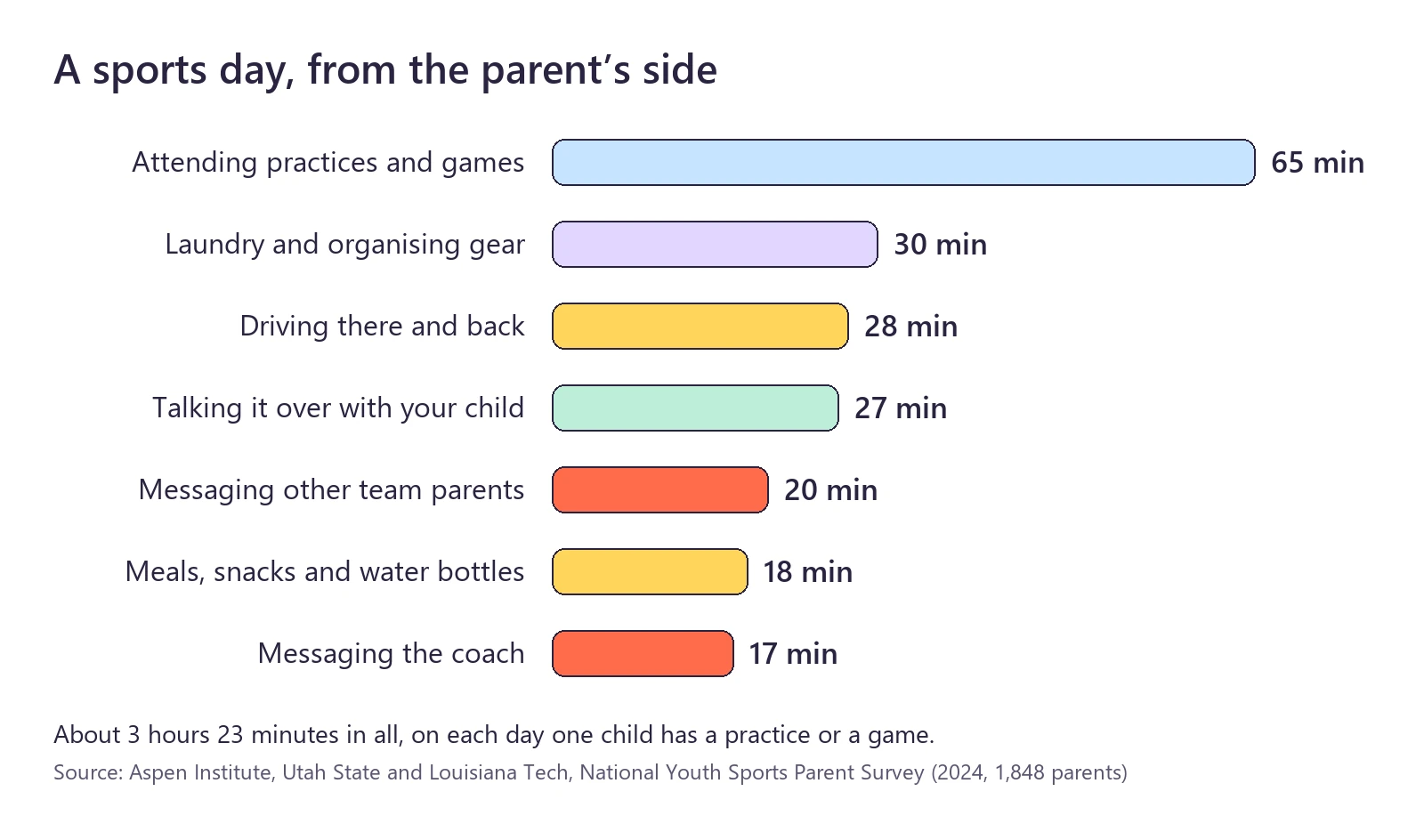
It adds up to 202.74 minutes. Project Play's own summary puts it as "3 hours, 23 minutes every day their child has a practice or game" (Project Play).
Look at the two coral bars. Thirty-seven minutes of a sports day goes on messaging other parents and the coach. That's more time than the driving. And when a 2026 AP-Ipsos poll asked sports parents what was hard, 84% named scheduling, logistics and the time commitment, ahead of the fees (AP-Ipsos).
Sport is only the part that's been measured. Nobody has surveyed the minutes that go into piano, tutoring, the school concert and the birthday party circuit, but they come out of the same evenings.
Who ends up keeping the calendar
In most families, one person does. Pew Research Center asked two-parent households where both parents work full time who manages the children's schedules and activities.
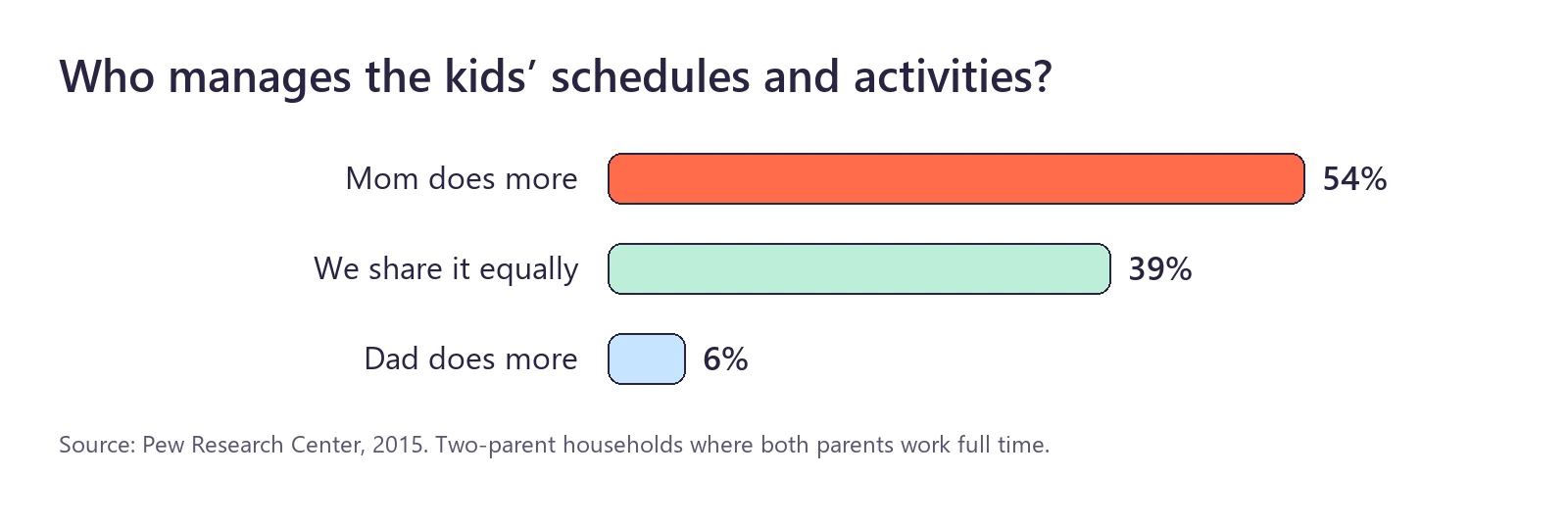
Both parents working the same hours, and the schedule still lands on one of them nine times as often as on the other (Pew Research Center, 2015). Pew asked again in 2022. Among mothers in opposite-sex couples, 78% said they do more of "managing their children's schedule and activities". About one in ten fathers said the same of themselves (Pew Research Center, 2023).
Other studies find the same thing by other routes. In a study of 393 American mothers, most of them married and well-off, 88% said they alone were mostly responsible for "organizing schedules for the family" (Ciciolla and Luthar, Sex Roles, 2019). A 2024 study of 3,000 US parents found mothers handle 71% of the household tasks that take mental effort, the planning and remembering rather than the doing (University of Bath).
There's a cost to that, and it's on the record. The US Surgeon General's 2024 advisory on parents' mental health reported that 33% of parents had high levels of stress in the past month, against 20% of other adults. It also notes that the time mothers spend on primary child care each week has risen from 8.4 hours in 1985 to 11.8 in 2022, and fathers' from 2.6 to 6.6 (Parents Under Pressure).
So when the system is "it's in Mum's head, and she'll text you", two things go wrong. She's doing a second job nobody sees. And the family has a single point of failure. The Thursday she's in a meeting with her phone face down is the Thursday nobody collects from basketball.
If you're wondering how lopsided it is in your house, the default parent quiz takes two minutes, and the mental load list names the jobs that never get counted.
Why the group chat makes it worse
Group chats are where plans are made, and they're good at that. They're a bad place to keep them.
The plan gets buried. A chat is in the order people spoke. The message that says practice has moved to 5:30 is exactly as prominent as the one that says "lol same". To find Saturday's party time you scroll, or you ask again, and now there are two answers in the thread.
There's one chat per group, and you're in a lot of groups. The swim team. The class. The carpool. The grandparents. The other parents from the party. Each child multiplies them. Nothing joins them up into one week.
Nobody owns anything. "Can someone grab Leo on Thursday?" gets a thumbs up from two people. Did either of them mean yes? A reaction is not a commitment. Three adults can leave that thread each believing one of the others has it.
It can't notice silence. If nobody answers, the chat doesn't know that's a problem. It will sit there quite happily until 5:15 on Thursday.
It doesn't reach the people who do the driving. Grandpa isn't in the team chat. The sitter isn't in the class one. So the one person who knows relays it by hand, which is the same job as before with more typing.
And it interrupts all day. There's research on what that does. In a well-known experiment, people who were interrupted finished their work just as fast, "but this comes at a price": more stress, more frustration and more time pressure (Mark, Gudith and Klocke, 2008). A parent fielding snack-rota messages during a work call is running that experiment on themselves every afternoon.
You don't need to leave the chats. You need the chat to stop being the record.
Why a shared calendar isn't enough either
A shared calendar is a real step up. Everything's in date order, both parents can see it, and the phone will remind you. Most advice on this subject ends there: get a family calendar, give each child a colour.
Here's what it leaves out.
An event has no owner. A calendar entry says "Swim, 5:00, Aquatic Centre". It doesn't say who's taking her. You can type a name into the title, and plenty of families do, but the calendar doesn't know that's what it means. It can't show you the events that have no name yet.
Changes can pass silently. This one surprises people. Google's own help page for the family calendar says: "you don't get notifications when a family member creates, edits, or deletes an event" (Google Calendar Help). Your partner moves pickup to 2:45 and your phone says nothing. Apple's shared calendars do tell you when someone changes one (Apple Support), which is better, though "the calendar changed" still isn't "you're the one collecting and the time just moved".
Reminders are personal. Apple's page on shared reminder lists says it directly: "Notifications that you set for your reminders aren't shared with anyone else" (Apple Support). The alert you set fires on your phone. It doesn't fire for the person who's doing the job.
Grandma isn't on it. Sharing a Google or iCloud calendar means everyone has an account of the right kind and has accepted the right invitation. Parents manage that. Grandparents, sitters and the neighbour in the carpool mostly don't, and a calendar that shows a sitter your whole family's month is more than she needs anyway.
A reminder app has the opposite gap. It will hold "buy gift" and "sign trip form". It won't hold Thursday at 5:00, and it isn't where the practices are. So the tasks are in one app, the times in another, the changes in the chat, and the question of who's driving is in somebody's head.
That's four tools. The gaps between them are where pickups get missed.
| Group chat | Shared calendar | Reminders app | What a family needs | |
|---|---|---|---|---|
| Shows the week in order | No | Yes | No | Yes |
| Says who's doing each pickup | Sometimes, somewhere up the thread | Only if you type it in | No | One name on every event |
| Shows what nobody has taken | No | No | No | Yes, and says so |
| Tells everyone when a time changes | If they read it | Depends on the app | No | Yes, including the person doing it |
| Works for grandparents and sitters | Only the chats they're in | Needs the right account | No | One tap, shows only what's theirs |
| Holds the to-dos with the events | No | No | Yes | Both in one place |
The days that aren't on any schedule
Even a perfect activity calendar misses the days that cause the most trouble, which are the ones when the default childcare, school, isn't there.
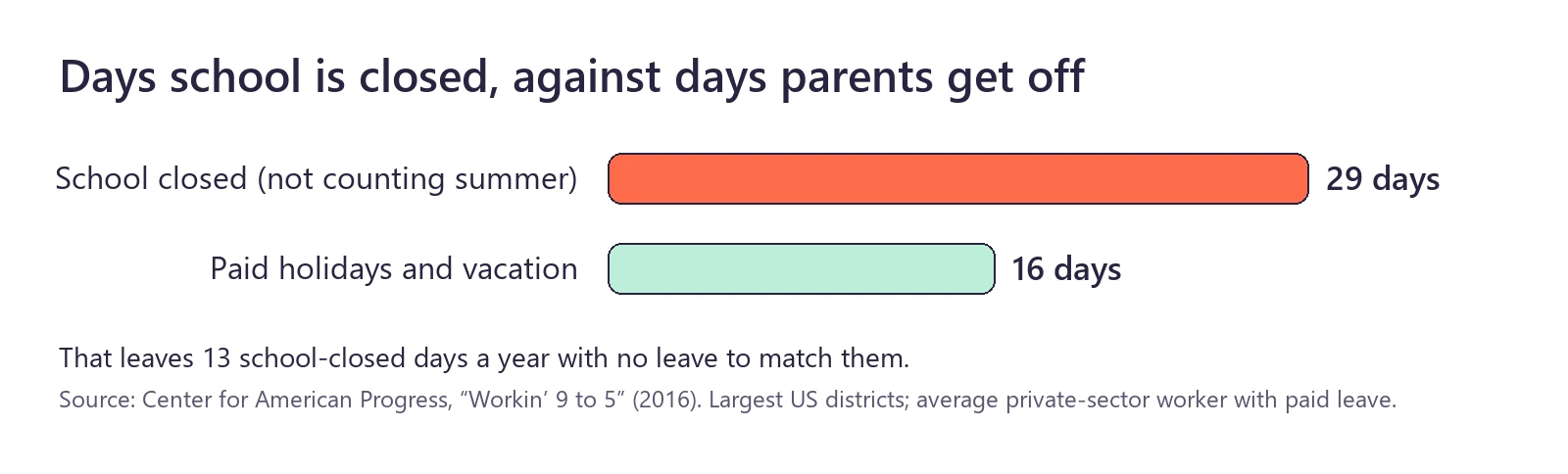
The Center for American Progress counted them: the largest US districts close for an average of 29 days a year outside summer, against 16 days of paid holidays and vacation for the average private-sector worker who has any. The same report found that 70% of parents work between 8:00 and 5:00, in a country where the school day typically ends before 3:00 (Center for American Progress).
PD days, early dismissals, the week before New Year. With several kids at different schools, those days don't even line up with each other. They belong in the same place as the practices, with a name beside each. For the next big one, there's a winter break childcare planner and a list of winter break dates by district.
What a system for several kids has to do
Whatever you use, paper included, it has to pass six tests.
- One place. Every practice, party, appointment and school closure, for every child. If you have to check two places, you'll check one.
- Every event has one name on it. One person, by name. "We" doesn't count, and neither does "probably me".
- Unclaimed is visible. The events with no name should stand out, and something should chase them before the day.
- Changes reach people. When a time or place moves, everyone who needs to know hears it, and the person doing that pickup hears it first.
- Everyone who drives is on it. Grandparents, the sitter and the carpool parent see their part without a login marathon, and without seeing everything else.
- To-dos sit beside events. The gift belongs next to the party it's for.
A paper calendar on the fridge passes tests 1 and 2 if you're disciplined, and fails the rest the moment you leave the kitchen. If you want to start on paper, the weekly family schedule prints a week with a driver column, and the carpool rotation generator splits the driving fairly between families.
Where Kid Pickup comes in
Kid Pickup is a family calendar built around the second test: who's doing it. It's on iPhone and in a browser at home or at work. Here's how it handles each of the six.
One place, without typing it all in. Paste the season schedule from the coach's email, or give it the PDF, and it reads the dates into a list for you to check before anything is saved. Follow a team calendar link, the kind TeamSnap or a school publishes, and it stays in step when a game moves. Connect Google Calendar and your own appointments come across. For things that repeat with the same child and place, a quick event is set up once and added to a day with a tap. There's more on getting schedules in at adding a sports schedule to your calendar.
Every ride has one name. Each pickup or drop-off is open until someone taps "I'll do it". Then their name and face are on it, and everyone in the family can see whose it is. You can ask one person by name, and they answer with a tap: accept, or "Can't make it".
Unclaimed gets chased. A pickup nobody has taken is tinted on the calendar, and the app sends nudges before it, to the parents, with an "I'll do it" button on the notification itself. At 7 p.m. each evening, everyone gets one summary of tomorrow: what's on and who has each one, including "nobody yet".
Changes are announced. Move Thursday from 3:15 to 2:45 and the family hears it in a sentence that says what it was and what it is now. The person who had claimed it gets their own message asking if it still works.
Grandparents and sitters, with limits. Invite them once. A helper sees the pickups that are theirs or still open, and nothing else of the family's week. They can choose to hear only about their own. Someone with no account at all can take a single pickup from a link you text them.
To-dos, lists and the rest. Homework, forms and gifts go in a To do list beside the events, with a reminder the evening before. An event can carry a "what to bring" list (that part is on the Premium plan), and whoever is going sees what's still unpacked in their reminder. There's a filter to look at one child's week at a time, and a family chat and feed, so "practice moved" has somewhere to go that isn't four group threads.
What it doesn't do: it doesn't talk to the school, the league or the coach, so their messages still arrive wherever they send them. It's the place you put them once, so they stop living in your head. Plans and prices are on the pricing page.
Start this Sunday, with or without an app
- Dump everything into one list. Every recurring activity, per child, with day, time and place. Add the one-offs for the next two weeks.
- Put a name beside each one. Do this together, out loud. It takes ten minutes and it's the whole method.
- Circle the ones with no name. Those are the week's real problems. Solve them now: a swap, a carpool, a grandparent, or drop something.
- Agree where changes go. One place. If it's in the chat, somebody moves it to the calendar the same day.
- Give the helpers their part. Send each person only their own days.
- Look at it again on Wednesday. Weeks drift.
We've written the Sunday routine up in more detail in Sunday family schedule planning, and the question of how many activities is too many in managing kids' activity schedules.
FAQ
How do you keep track of multiple kids' activities?
Put every activity, appointment and school closure for every child in one shared place, and put one adult's name on each. Review it together once a week, and agree that any change made in a chat gets moved to the calendar the same day.
Why don't group chats work for family scheduling?
A chat keeps messages in the order they were sent, so the plan gets buried. There's a separate chat for every team and class, nobody is clearly responsible for a request, and a chat can't warn you when nobody has answered.
Is Google Calendar enough for a family with several kids?
It shows the week well, but an event has no owner, so it can't show which pickups nobody has taken. Google's help page also says family calendar members aren't notified when someone creates, edits or deletes an event.
How much time do parents spend on kids' sports?
About 3 hours and 23 minutes on each day a child has a practice or game, according to the Aspen Institute's 2024 survey of 1,848 sports parents. That includes roughly 65 minutes attending, 28 driving and 37 messaging coaches and other parents.
Who usually manages the family schedule?
Usually the mother. In Pew Research Center's survey of two-parent households where both work full time, 54% said the mother does more of managing the children's schedules, 39% said it's shared equally and 6% said the father does more.
What should a family calendar app do for multiple kids?
Hold every child's events in one place, show who is doing each pickup, flag the ones nobody has taken, tell everyone when a time changes, let grandparents and sitters see their own part, and keep to-dos next to the events they belong to.
How many activities should each child do?
Research suggests most children aren't overscheduled: the average is about five hours a week of organized activities. With several children the limit is usually the adults' time and driving, so count the trips before adding another.