
A news feed for your family, and nobody else.
Updates and photos from the people who raise your kids, with today’s pickups at the top. Only your family sees it.
- No ads
- No algorithm
- No strangers
- No location in photos

Most family apps make you choose between the news and the week
Family calendar apps keep the schedule but not the news: Cozi, TimeTree, Jam and Skylight have no feed. Family photo apps keep the photos but not the week. And the big feeds are built for everyone, ranked by an algorithm and paid for by ads.
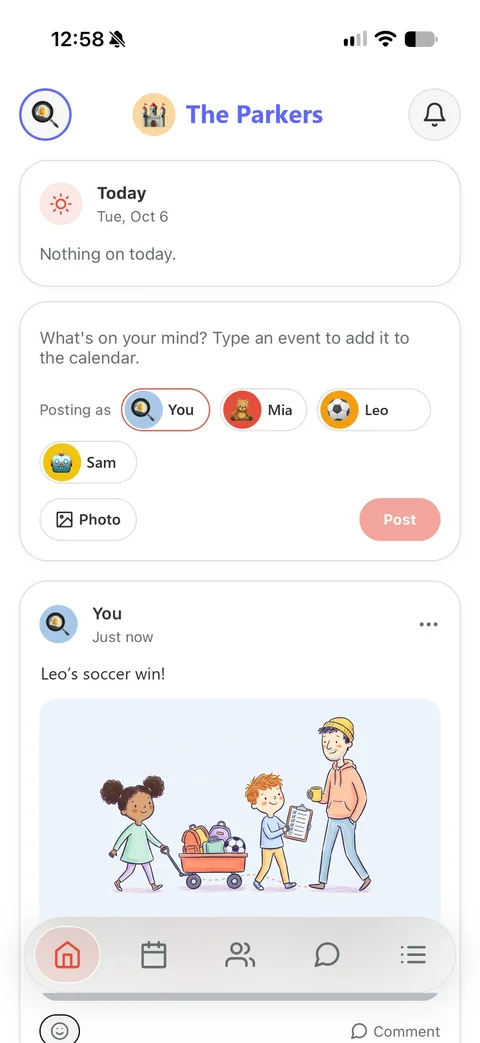
Kid Pickup is one of very few family apps that puts both in one private place. The day’s pickups sit at the top, with who has each one. Underneath: the photo from soccer, “running ten minutes late” from Grandma, and what happened to every pickup.

How it’s different from Facebook, Instagram and photo-album apps
A feed is a feed until you ask who sees it, who decides what comes first, and who’s paying for it.
| Question | Kid Pickup | Facebook and Instagram | FamilyAlbum and Tinybeans |
|---|---|---|---|
| Who sees a post | Only the family you invited | Depends on your settings; on Instagram the default is public | Only the people you invite |
| Who decides the order | Newest first. Nothing is ranked | An AI system ranks posts for each person | Your photos, by date |
| Ads | None | Yes: paid for by personalized ads | In the free versions, by their own App Store listings |
| Who can join | Only someone you invite | Anyone 13 or older | Only someone you invite |
| Children | No accounts. A parent can post as a child | Minimum age 13 | No child accounts |
| Pickups and the week | Today’s pickups at the top, and an update on every one | No | No |
| Price | Part of every plan: Family $5.99/mo, 14 days free | Free, paid for by ads | Free with ads; FamilyAlbum Premium from $5.99/mo, Tinybeans+ $7.99/mo |
Facts about other apps come from their own pages, linked under Sources, checked October 12, 2026. Family photo apps vary; the column shows what the two biggest say about themselves.
The feed knows what day it is
Home is the first screen in Kid Pickup, so the news sits next to the thing your family actually has to get right today: who’s picking up.
Today’s pickups first
Each one with who has it, and OPEN on any that still need someone. Anything in the next hour goes to the very top.
Every pickup update, with where it stands now
Added, claimed, called off. Each update carries a badge that stays current: Unclaimed, Claimed by Grandma, Done.
Type a plan, get a pickup
“Soccer Thursday at 4” and Home offers to add it to the calendar, with the form filled in for you to check.
Posts from the kids
A parent or guardian can post as one of the children. The post shows the child, with the grown-up’s name underneath.
React, comment, edit
An emoji or a comment on any post, and you can edit your own. Nobody can change what you wrote.
Its own off switch
Turn off Feed Notifications and the pickup alerts keep coming. A busy feed never silences “nobody has this yet”.
A safe first place for kids to learn how posting works
Most social media has a minimum age of 13, and the defaults are often public. Before that, a family feed is a good place to practise with a parent: a small audience you both know, no strangers, and nothing ranked to keep anyone scrolling.
Children don’t get accounts in Kid Pickup. A parent or guardian posts on a child’s behalf, which makes every post something you write together, and a chance to talk through the habits pediatricians and privacy experts recommend.
Think about who will see it
Pick the audience before the words. Experts suggest keeping family posts to family, in invite-only places.
In Kid Pickup: only the family you invited sees a post. There are no public profiles, followers or links.
Ask before posting someone
Get a person’s OK before sharing a photo they’re in, and ask your child before posting about them. It teaches consent by doing it.
In Kid Pickup: write a post with your child, ask Grandma before you share her photo, and post it as your child if they’d like.
Leave out where you are
Photos from a phone can carry the place they were taken. Leave school names, signs and addresses out of the picture too.
In Kid Pickup: the location stored in a photo is removed before it uploads. The school sign in the background is still yours to spot.
Once it’s out, it’s hard to take back
Deleting something doesn’t mean everyone who saw it has forgotten it. Post what you’d be happy to see again in ten years.
In Kid Pickup: a deleted post leaves the feed at once and our servers after 30 days. The people who saw it still saw it.
Be kind, and know how to report
Don’t post anything mean, and know how to block and report when something isn’t right. Tell a trusted adult.
In Kid Pickup: tap the three dots to report a post or comment; a parent or guardian can delete anything in the family.
Notice what pulls you in
Likes, endless scrolling, recommended posts and constant notifications are built to keep people on a screen. Talk about why.
In Kid Pickup: the feed is newest first, with nothing recommended, and you can turn its notifications off.
Kid Pickup isn’t a social media app for kids, and children never sign in. When yours are ready for their own accounts, the American Academy of Pediatrics’ Family Media Plan is a good place to start the conversation.
Private by design, down to the photo
- A photo is shrunk on your phone before it uploads, which also removes the location your camera stored in it.
- Photos are kept in private storage and shown only to your family, through links that expire within the hour. Nothing is public by URL.
- A post or comment you delete disappears from the feed at once, and is removed from our servers 30 days later.
- Deleting your account deletes your posts and photos. If you own the family, it deletes the whole family’s.
- Anyone can report a post with the three dots; a parent or guardian can delete any post; a short list of words is blocked; removing someone stops them seeing the feed.
- Everyone you’ve invited reads the feed, the sitter included. Post with that in mind.
The privacy policy has the details.
Questions parents ask
Is Kid Pickup social media?
It’s the family part of social media without the rest. Home is a private feed for your family only: no public profiles, no followers, no ads and no algorithm deciding what you see. Posts are newest first, and only people you invited can read them.
Who can see what I post?
Everyone in your family you’ve invited, including grandparents and any sitter or nanny. Nobody outside the family can find or read the feed.
Can my child have their own account?
No. Children don’t get accounts. A parent or guardian can post as one of the children, and the post shows the grown-up’s name underneath.
Is it safe to post pictures of my kids in Kid Pickup?
It’s private by design: photos are kept in private storage, shown only to your family through links that expire within the hour, and the location your camera stored is removed before upload. It’s still worth thinking about what you share, as the American Academy of Pediatrics suggests.
How is it different from FamilyAlbum or Tinybeans?
They are photo albums, free with ads, and on Android too. Kid Pickup’s feed sits on top of your family’s pickups and calendar, has no ads, and is on iPhone for now. It’s part of a subscription after a 14-day trial.
Is there a Facebook alternative for families?
For sharing within a family, a private feed like Kid Pickup’s Home, or a private photo app, keeps posts to the people you invite, with no ads or ranking. Facebook’s feed is ranked by an algorithm and paid for by ads.
Does the feed cost extra?
No. Home is on every plan, the free trial included.
Does everyone need an iPhone?
Yes, for now. Kid Pickup is on iPhone; Android is on the way.
Sources
- Meta: Facebook Terms of Service
- Meta Transparency Center: how Facebook Feed is ranked
- Instagram Terms of Use
- Meta Transparency Center: how Instagram Feed is ranked
- FamilyAlbum on the App Store
- Tinybeans on the App Store
- Cozi
- TimeTree on the App Store
- Jam family calendar
- Skylight
- U.S. Surgeon General: Social Media and Youth Mental Health (2023)
- American Academy of Pediatrics: sharing photos and videos of children on social media
- HealthyChildren.org (AAP): Sharenting, 5 questions to ask before you post
- HealthyChildren.org (AAP): How to make a Family Media Plan
- Common Sense Media: Is it safe to post pictures of my kid online?
- Common Sense Media: Help! My kid wants to use social media
- MediaSmarts: Digital citizenship, ethics and privacy (tip sheet)
- Office of the Privacy Commissioner of Canada: 12 online privacy tips for parents
- FTC: Living Life Online
Home is on every plan, the free trial included. See plans and pricing
Group chats, shared albums and Facebook groups compared: A private social media app for families
Everything new in the release that brought it: What’s new in Kid Pickup 1.5.3
Comparing family apps? Cozi alternatives in 2026
Try Home with your family
Two weeks free, no payment to start. Invite the grandparents and the sitter; they don’t pay.
Start your 14-day free trial