

Kid Pickup 1.5.3 is on the App Store now, as a free update for everyone on iPhone. If your phone updates apps by itself, you already have it. It's the first release since 1.4.1, so it carries everything we built in between.
The big change is a new first screen. The app now opens on Home: one private feed for your family, with today's pickups at the top. The calendar is one tap away. Here's everything in it, with screenshots.
Home: a private feed for your family
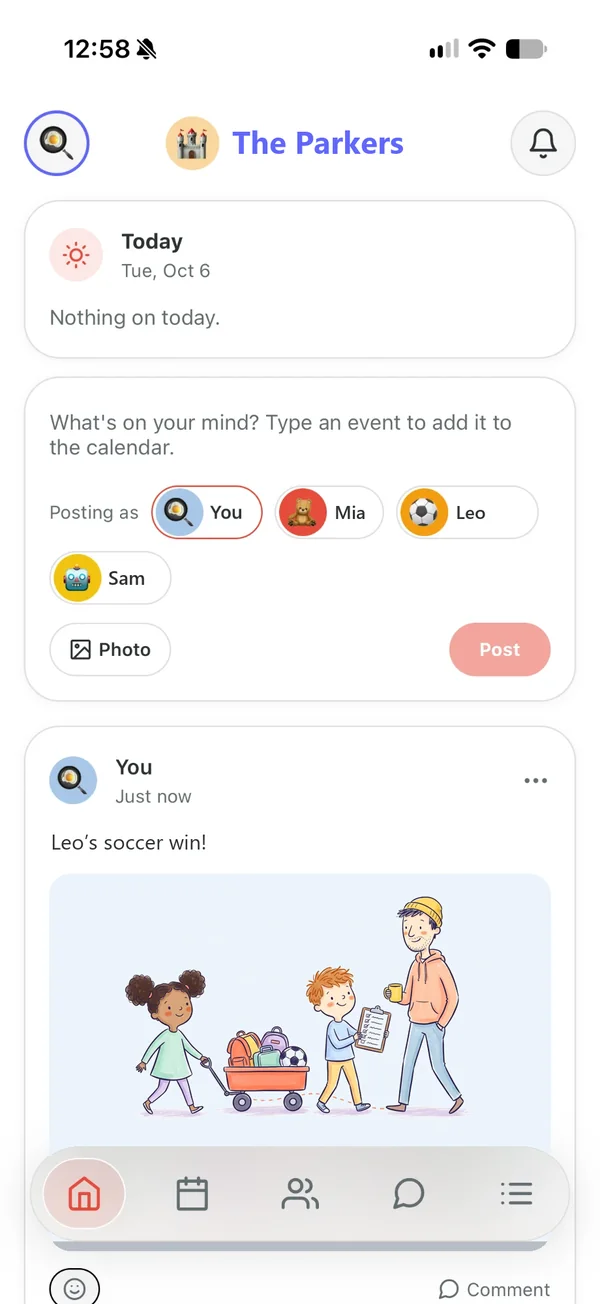
Home sits under your family's name and avatar. It's for the day's back-and-forth: "Running ten minutes late." "Look who scored." A photo of the art project that came home on the bus.
How it compares with group chats, shared albums and Facebook groups: a private family feed, with the pickups built in.
- Anyone in the family can post an update, with a photo if they like. That includes grandparents, the sitter and everyone else you've invited.
- Everyone in the family sees it, and nobody outside it does. There are no public profiles, no followers and no public links.
- Each post is in the colour of whoever posted it, like a message in Chat.
- React to a post with an emoji, or tap Comment to answer it. When someone posts, the app sends a notification to the rest of the family. A comment sends one to the person who posted.
- A parent or guardian can post as one of the children. The post shows the child's name and avatar, with the adult's name underneath. Children don't have accounts; the grown-up who posts is the one behind it.
- You can edit a post you wrote. Tap the three dots on it to change the words, and the post is marked as edited. Nobody else can change what you wrote.
Today's pickups, at the top
The top of Home shows today's pickups and who has each one. A pickup nobody has taken yet says OPEN. Anything starting in the next hour is listed above them, so the one that matters right now is the first thing you see.
What happens to a pickup shows up in the feed too: added, claimed, called off and the rest, mostly with the avatar of whoever did it. Each of those updates carries a badge saying where the pickup stands now: Unclaimed, Claimed by whoever has it, Done, Cancelled or Missed. So an update from this morning about an open pickup tells you, this afternoon, whether somebody has taken it since.
Type it, and Home offers to add it
The box at the top of Home is for posts and for events. Type something that sounds like an event, like "Can someone pick up Leo from swim Thursday at 4:30?", and a line under the box offers to add it to the calendar. Tap Post and Home asks which you meant: add it to the calendar, or just post it.
Choose the calendar and the pickup form opens straight away, filled in from what you wrote. If the sentence can't be read within a few seconds, the form opens anyway with your words in Notes, so you're never left waiting on a stuck screen. Nothing is saved until you check it and tap Create.
You decide who can change what
The family owner now decides what each parent or guardian can do with pickups:
| Setting | They can |
|---|---|
| Any pickup | Add pickups, and change, call off or delete anyone's |
| Only their own | Add pickups, and change or delete the ones they added |
| None | See the calendar and take pickups on, but not add or change them |
Set it when you invite them, or later from their profile in the Family tab. Taking a pickup on, letting it go and marking it done stay open to everyone, whatever the setting.
A calendar and a list that read at a glance
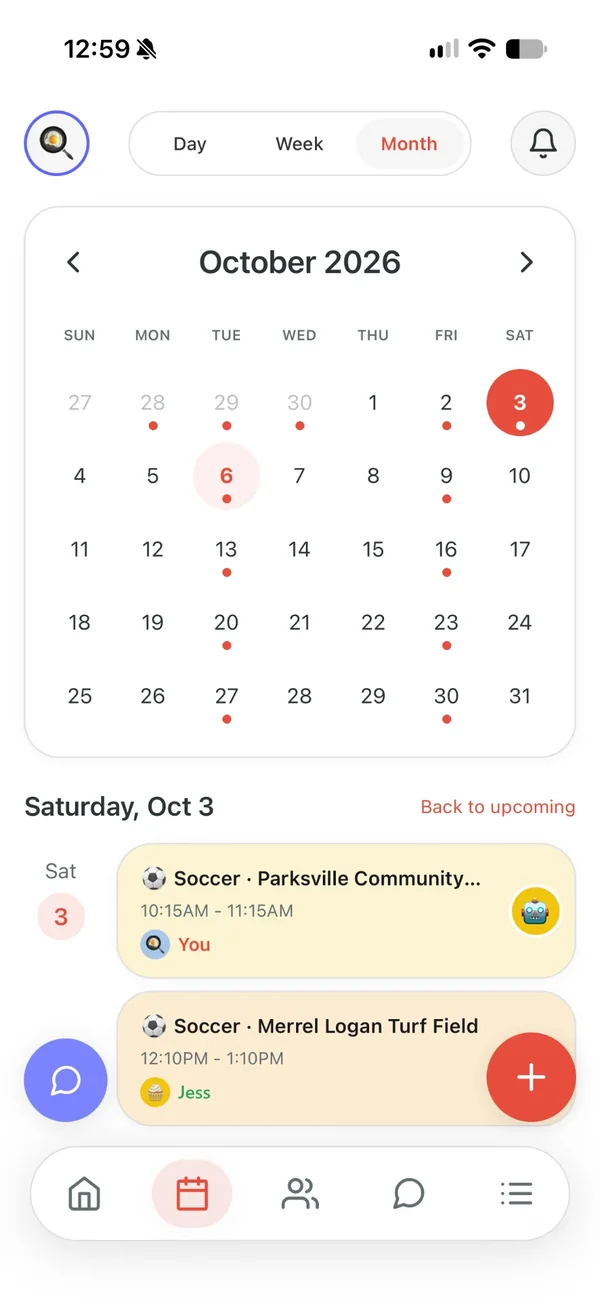
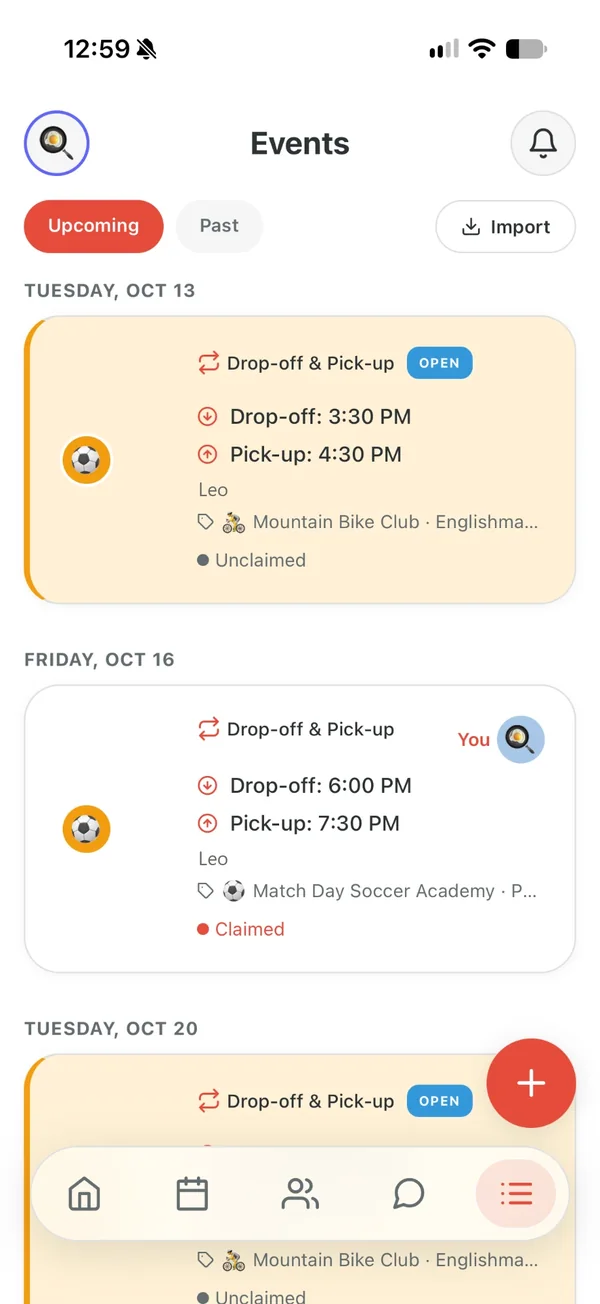
- Dashboard is now Calendar, and the month sits on a card of its own.
- Calendar's Week view is a list of that week's pickups, a day at a time.
- On a pickup's card, whoever has it is shown in the top right corner, with their avatar.
Getting around
- The bottom bar is Home, Calendar, Family, Chat and Events. The highlight slides to the tab you tap.
- A new pickup starts from the box on Home or the + on Calendar. The assistant's button is on the Calendar screen, and the assistant is still part of Premium.
- Every tab has the same header, Chat included: your avatar on the left, the bell on the right.
- Cards look the same on every screen, with the same edge, corners and soft shadow as on Home.
Your family, front and centre
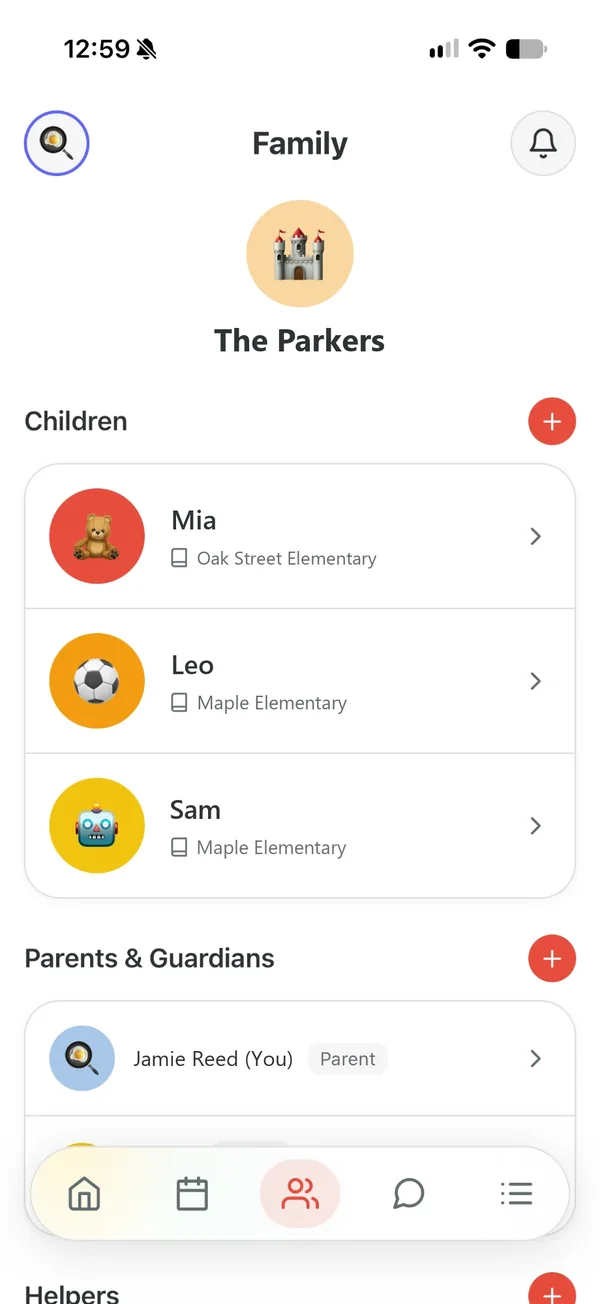
The Family screen now opens with your family's avatar and name. Below it: the children, then the parents and guardians, then everyone else who helps.
Notifications, your way
- Email notifications, if you want them. Switch on Email Notifications in Settings and the app sends an email as well when you're asked to do a pickup, or when one still needs someone. It's off unless you turn it on, and nothing is sent until you've confirmed your address.
- The feed has its own notification switch. Turn off Feed Notifications in Settings to stop notifications about posts and comments. The ones about pickups keep coming.
Keeping it kind
Tap the three dots on a post or comment to report it. Reports come to us. You can delete your own posts and comments, and a parent or guardian can delete any of them in the family. A short list of words is blocked automatically. Removing someone from your family stops them seeing or posting in its feed.
Where photos go
- A photo is shrunk on your phone before it uploads, which also removes the location your camera stored in it.
- Photos are kept in private storage and shown only to your family, through links that expire within the hour. Nothing is public by URL.
- A post or comment you delete disappears from the feed at once. It and its photo are removed from our servers 30 days later, which leaves time to look at one that was reported.
- Deleting your account deletes your posts and photos. If you own the family, it deletes the whole family's.
The privacy policy has the details.
Ready for iPhone Duo
Apple's foldable iPhone arrives October 23. Kid Pickup runs on it from day one, closed or open: open, it shows in an iPhone-sized window for now, the way Apple runs apps that haven't moved to its newest tools yet. The layout for the big screen is already built, and it switches on with the update that makes that move.
And the rest
- Updated Terms of Service. The Terms now cover the feed, and the app asks you to agree to them once when you first open this version.
- In Chat, a reaction sits on the corner of the message it answers.
- Avatars sit in the middle of their circles.
- In dark mode, Chat's header is dark too.
- Sign-in and sign-up link to the Terms of Service and Privacy Policy.
Getting it
Update Kid Pickup from the App Store. Home is on every plan, the free trial included, and prices haven't changed. Your family, your pickups and your settings carry straight over.
If something in 1.5.3 doesn't work the way this post says, tell us. It comes straight to the person who built it.