
How to post an update or photos on Home
On Home, tap the box at the top, type your update, and tap Photo to add up to three pictures from the camera or your library. Parents can post as one of the kids under Posting as. Tap Post. Only your family sees it, and the app sends them a notification.
Where to find it
- Home
- What’s on your mind?
Who can do this
Everyone in the family, grandparents and sitters included. Posting as a child is for parents and guardians.
Step by step
Open Home and tap the box that says What’s on your mind?
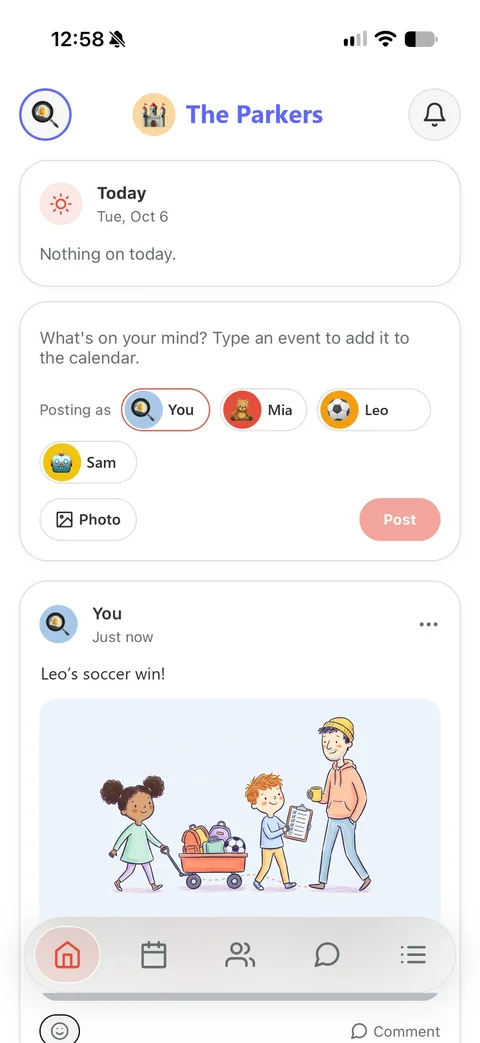
Type your update.
Tap Photo, then Take a photo or Choose from library. You can add up to three. Tap the × on one to take it off.
Parents and guardians: under Posting as, tap a child to post as them.
Tap Post. If it reads like a plan (“Soccer Thursday at 4”), you’re asked whether to Add to calendar or Just post it.
To change it later, tap … on your post: Edit, Delete or Report.
What happens next
- Everyone else in the family gets a notification, like “Ash posted”, unless they’ve turned Feed Notifications off.
- Editing a post tells nobody, and the post says “edited”.
Good to know
- Photos are shrunk before they’re sent, which also removes the location the camera saves in them.
- A parent or guardian can take down anyone’s post, but only the person who wrote it can edit it.
- Deleted posts are gone for good after 30 days.
Checked against Kid Pickup 1.6.2 on October 21, 2026. Something look different on your phone? Tell us and we’ll fix the guide.
Questions about this
Who can see posts on the Kid Pickup feed?
Only the people in your family: the parents and anyone you’ve invited. There are no public profiles, followers or links.
Can my kids post?
Children don’t get accounts. A parent or guardian can post as one of them, and the post shows the child with “via” the parent underneath.
Read next
All help guides · Ask a person
Not using Kid Pickup yet? It’s free for 14 days, and grandparents and sitters never pay.
